Delegate(델리게이트)
델리게이트란 함수의 주소 값을 가지고 있어 해당 함수를 대신 호출할 수 있다. (함수에 대한 참조)
델리게이트는 콜백을 해준다. (콜백 : 함수를 먼저 참조하고 나중에 호출한다) 함수를 미리 참조해놓고 나중에 원할 때 호출할 수 있다. (코드가 의존적이지 않고 유연하다)
또한 여러 개의 함수를 한 번에 실행하는 체인 기능(델리게이트 체인), 어떠한 상황에 대한 이벤트를 발생(델리게이트 이벤트)할 수 있다.
왜 사용할까? 그냥 바로 해당 함수를 실행해도 되지 않을까? 델리게이트는 타입이다. 타입은 매개변수나 반환 형식으로 사용할 수 있다. 즉 특정 함수를 매개변수로 받아오거나 반환 타입으로 사용하고 싶을 때 사용한다.
예를 들어 A클래스에서 B클래스에 있는 함수를 사용하고 싶을 때 델리게이트를 사용한다면 B클래스에 직접적인 접근을 할 필요도 없고, 함수 이름도 알 필요없이 델리게이트에 등록만 해주면 사용이 가능하다.
단점 : 어떤 함수가 연결되어 있는지 일일이 찾아야 한다. (코드 분석이 힘듦)
델리게이트 정의 방법
대신 호출할 함수의 형식(시그니처 : 함수의 반환 타입과 매개변수 목록)을 확인한다.
접근 제한자 delegate 반환 형식 식별자 (매개변수);
public delegate void DelegateTest(string msg); // 델리게이트 선언
델리게이트 사용 시 주의할 점
델리게이트는 리턴 타입과 매개 변수가 모두 일치해야한다.
일단 예시 코드를 봐보자
반환 타입이 없는 델리게이트
using System.Collections;
using System.Collections.Generic;
using UnityEngine;

public class DelegateEx : MonoBehaviour
{
    // 델리게이트 기본적인 사용 법
    public delegate void MyDelegate(); // 델리게이트 타입 정의
    public MyDelegate myDelegate; // 선언한 델리게이트의 변수(객체) 선언

    public void Test()
    {
        Debug.Log("Test 함수 실행");
    }

    // Start is called before the first frame update
    void Start()
    {
        myDelegate = new MyDelegate(Test); // C# 1.0 버전 사용법
        myDelegate = Test; // C# 2.0 버전 사용법

        myDelegate(); // 사용
    }

}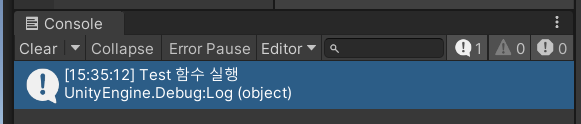
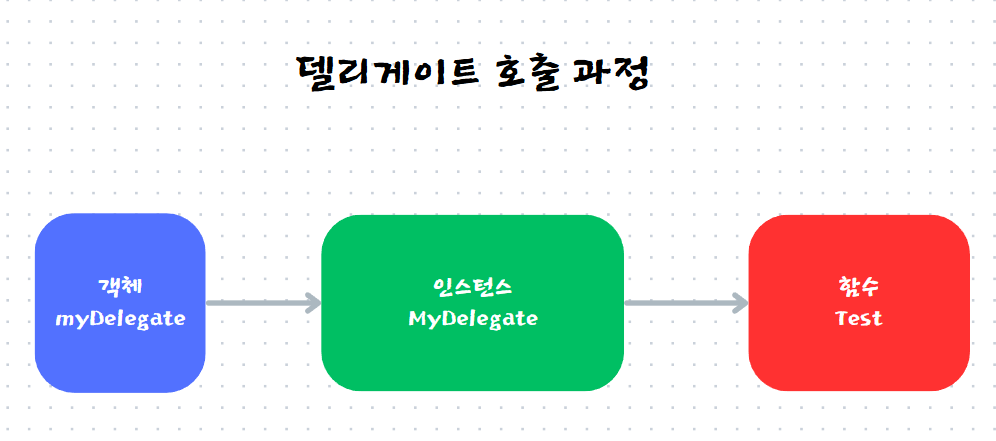
위 코드랑 그림에서 델리게이트 기본 사용 법과 호출 과정을 보여 준다.
C# 2.0 버전 부터는 new 키워드 없이 축약해서 사용이 가능하다.
반환 타입이 int형인 델리게이트
using System.Collections;
using System.Collections.Generic;
using UnityEngine;

public class DelegateEx : MonoBehaviour
{
    public delegate int IntDelegate(int num1, int num2);

    public IntDelegate intDelegate;

    public int Add(int num1, int num2)
    {
        return num1 + num2;
    }

    public int Sub(int num1, int num2)
    {
        return num1 - num2;
    }

    void Start()
    {
        intDelegate = Add;
        Debug.Log(intDelegate(10, 5));
        intDelegate = Sub;
        Debug.Log(intDelegate(10, 5));
    }

}
위 코드를 보면 intDelegate 객체에 Add 함수를 참조하여 매개 변수 형식에 맞게 intDelegate를 실행하면 다음과 같은 결과가 나온다. Sub 함수도 마찬가지로 참조하여 매개 변수 형식에 맞게 사용할 수 있다.

델리게이트 타입 활용
using System.Collections;
using System.Collections.Generic;
using UnityEngine;

public class DelegateEx2 : MonoBehaviour
{
    public delegate void TestDelegate(); // 델리게이트 타입 선언

    TestDelegate testDelegate; // 객체 정의

    void Do(TestDelegate del)
    {
        // 두 개 모두 똑같은 실행법이다.
        del();
        del.Invoke();
    }

    void TargetFunction()
    {
        // 여기 있는 코드를 사용하고 싶다.
        Debug.Log("TargetFunction");
    }

    void Start()
    {
        testDelegate = TargetFunction; // 함수 참조
        Do(testDelegate);
    }
}
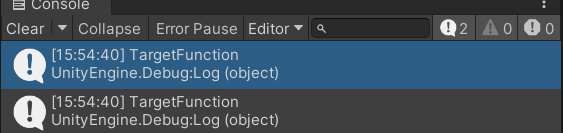
위 코드를 보면 TestDelegate 타입을 선언하고 testDelegate 객체를 정의한다. 그리고 TestDelegate 타입을 매개 변수로 받는 Do 함수를 작성해 받은 델리게이트를 실행한다. 내가 실행하고 싶은 TargetFunction 함수를 testDelegate에서 참조해 Do의 매개 변수(TestDelegate del)로 넘겨줘 대신 실행한다.
이처럼 델리게이트는 타입이라는 특성을 활용해 매개 변수로 받아서 실행할 수 있다.
del(); 실행과 del.Invoke(); 실행은 똑같은 실행법이다.
다른 방식으로 코드를 작성해보자
using System.Collections;
using System.Collections.Generic;
using UnityEngine;

public class DelegateEx2 : MonoBehaviour
{
    public delegate void TestDelegate(); // 델리게이트 타입 선언

    TestDelegate testDelegate; // 객체 정의

    TestDelegate Do()
    {
        return testDelegate = TargetFunction;
    }

    void TargetFunction()
    {
        Debug.Log("TargetFunction");
    }

    void Start()
    {
        TestDelegate result = Do();
        result.Invoke();
    }
}

위 처럼 반환 타입이 TestDelegate인 Do함수를 작성해서 TargetFunction 함수를 testDelegate 객체(델리게이트)에 등록해 TestDelegate 타입으로 변환해 result에 반환 값을 넘겨 호출할 수 있다. 즉, 내가 사용하고 싶은 함수를 특정 반환 타입으로 하고 싶을 때 사용한다.
지금까지 델리게이트의 기본적인 원리와 개념에 대해 알아봤다. 이제 델리게이트 체인과 델리게이트 이벤트에 대해 알아보자.
델리게이트 체인(Delegate Chain)
델리게이트 체인이란 하나의 델리게이트가 여러 함수를 참조하여 델리게이트 객체를 한 번 실행함으로써 등록된 모든 함수를 같이 실행할 수 있는 것을 말한다.
즉, 하나의 델리게이트에 여러 함수를 등록해 연쇄적으로 호출한다.
+= 연산자를 통해 추가할 수 있고, -= 연산자를 통해 추가된 함수를 삭제할 수 있다.
기본 예시를 보자
using System.Collections;
using System.Collections.Generic;
using UnityEngine;

public class DelegateChainEx : MonoBehaviour
{
    // 델리게이트 체인 (Delegate Chain)
    // 하나의 델리게이트가 여러 함수를 동시에 참조할 수 있다.

    private delegate void TestDelegate();

    TestDelegate testDelegate;

    void Chain1() { Debug.Log("Chain1"); }
    void Chain2() { Debug.Log("Chain2"); }
    void Chain3() { Debug.Log("Chain3"); }

    void Start()
    {
        testDelegate += Chain1; // Chain1 함수 추가
        testDelegate += Chain2;
        testDelegate += Chain3;

        testDelegate?.Invoke();

        testDelegate -= Chain2; // Chain2 함수 삭제

        testDelegate?.Invoke();
    }
}

위 처럼 += 연산자를 이용해 등록하여 testDelegate 실행 시 등록된 모든 함수를 연쇄적으로 실행시킨다. 또한 -= 연산자를 통해 등록된 Chain2 함수 참조를 제거해 두 번째 실행 때 Chain2 함수가 빠진 것을 볼 수 있다.
여기서 testDelegate를 실행할 때 testDelegate?.Invoke() 라는 것을 볼 수 있다. 위 쪽에서 Invoke()를 사용하면 델리게이트를 실행한다라고 했다.
testDelegate?.Invoke()는 ?의 역할은 testDelegate가 비어있지 않다면(Null이 아니라면)을 판별해준다. 즉, 이 코드는 실행할 testDlegate에 함수가 하나라도 등록되어 있다면 실행하고, 등록된 함수가 없다면 실행하지 말아라 라는 코드이다.
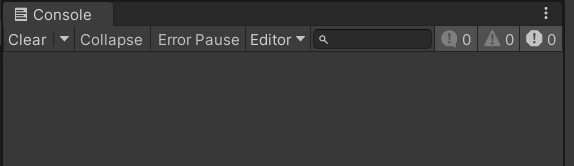
궁금하니까 델리게이트가 비어있는 상태에서 ?가 있고 없고의 차이를 보자.
using System.Collections;
using System.Collections.Generic;
using UnityEngine;

public class DelegateChainEx : MonoBehaviour
{
    // 델리게이트 체인 (Delegate Chain)
    // 하나의 델리게이트가 여러 함수를 동시에 참조할 수 있다.

    private delegate void TestDelegate();

    TestDelegate testDelegate;

    void Chain1() { Debug.Log("Chain1"); }
    void Chain2() { Debug.Log("Chain2"); }
    void Chain3() { Debug.Log("Chain3"); }


    void Start()
    {
        testDelegate?.Invoke();
    }
}
using System.Collections;
using System.Collections.Generic;
using UnityEngine;

public class DelegateChainEx : MonoBehaviour
{
    // 델리게이트 체인 (Delegate Chain)
    // 하나의 델리게이트가 여러 함수를 동시에 참조할 수 있다.

    private delegate void TestDelegate();

    TestDelegate testDelegate;

    void Chain1() { Debug.Log("Chain1"); }
    void Chain2() { Debug.Log("Chain2"); }
    void Chain3() { Debug.Log("Chain3"); }


    void Start()
    {
        testDelegate.Invoke();
    }
}
위와 같은 결과가 나온다.
일단 델리게이트 기본 사용법과 델리게이트 체인에 대해 간단히 알아보았다. 다음 포스팅에서는 델리게이트를 실제 어떻게 사용하는지에 대해서 공부하고 정리할 예정이다.
'Unity C# > 개념 및 문법 정리' 카테고리의 다른 글
| [Unity C#] 람다식(Lambda Expression) 기초 개념 (0) | 2025.01.27 |
|---|---|
| [Unity C#] Lerp 함수 (0) | 2025.01.21 |
| [Unity C#] Time.deltaTime (0) | 2025.01.21 |
| [Unity C#] 객체 지향 _ 상속(추상 클래스, 인터페이스, 다중 상속) (1) | 2025.01.17 |
| [Unity C#] 객체 지향 _ 다형성 (0) | 2025.01.16 |